Problem terjadi bisa karena audio dikenali sebagai microsoft HD Audio. Software bisa diinstal bia microsoft hd audio di uninstall dulu. Harus dibuat bagaimana caranya agar microsoft hd audio menjadi realtek hd audio.
Tuesday, July 19, 2022

Wednesday, April 20, 2022
Windows 7 terlalu lama waiting saat welcome setelah login di jaringan
Penyebabnya adalah komputer tidak bisa mendapatkan group policy.
Banyak yang coba coba tapi gagal:
https://social.technet.microsoft.com/Forums/ie/en-US/ee7cb4e4-7d14-4f1c-86a6-c93463acd9d3/group-policy-failure-on-windows-7-computer?forum=winserverGP
Cara yang terbukti efektif adalah dengan mematikan service untuk group policy. Bisa lewat registry.
[HKEY_LOCAL_MACHINE\SYSTEM\CurrentControlSet\services\gpsvc]
Merubah "Start" menjadi "4". harus dirubah permissionnya dan di take ownership dulu sebelum merubah.
Namun ini berarti policy yang diterapkan di jaringan tidak akan diterapkan di komputer yang dirubah.
Saran lain adalah membuat waktu menunggu menjadi 5 detik dengan memberi nilai lima pada:
Computer Configuration/Administrative Templates/System/Group Policy/Startup policy processing wait time
diakses dari policy editor, lewat menjalankan gpedit.msc. Namun cara ini tidak berhasil membuat start lebih cepat.
Thursday, August 26, 2021
Solusi masalah Qualcomm Atheros AR9485 sering disconnect sendiri di windows 10
Beberapa mungkin mengalami koneksi wifi Qualcomm Atheros AR9485 Wireless Network Adapter sering putus sendiri dan tidak bisa nyala lagi kecuali di restart atau dipaksa sleep.
Masalah ini terdeteksi muncul semenjak update dari windows 10. Solusinya sebaiknya coba upgrade driver di versi yang terakhir.
Bila gagal update ke driver untuk versi windows 10 yang paling pertama.
Driver bisa didownload di:
https://www.catalog.update.microsoft.com/Search.aspx?q=ar9485
Sunday, June 20, 2021
Bila stereo mix tidak muncul atau tidak bisa record system sound di windows 7
Dari control panel - hardware and sound - manage audio device -
Masuk ke tab recording. Klik kanan layar dan cawang show disabled devices. Lalu enable stereo mix.
Friday, May 7, 2021
Solusi tidak bisa browse windows printer via samba di ubuntu 21.04, dan untuk bisa print tanpa di held
Solusinya adalah install :
apt install python3-smbc samba smbclient
Untuk bisa print di windows
matikan dulu cups:
service cups stop
edit file /etc/cups/printers.conf
cari deviceuri, tambahkan username password:
domain%5Cusername:password@namakumputer/namaprinter
Thursday, May 6, 2021
blank screen saat install atau setelah install ubuntu 21.04 di komputer motherboard AMD / ATI
Solusi lengkap di sini:
https://www.stephenwagner.com/2019/05/05/ubuntu-linux-black-screen-frozen-system-after-upgrade-install/
Intinya harus menambahkan nomodeset di setelan grubnya.
edit/etc/default/grub
tambahkan nomodeset di:
GRUB_CMDLINE_LINUX_DEFAULT="quiet splash nomodeset"
lalu jalankan
update-grub
pada saat booting tekan shift lalu tekan e pada pilihan boot dan tambahkan nomodeset
Bila read only, jalankan:
mount -o remount,rw /
mount -a
Monday, April 19, 2021
mengatasi windows 7 masuk user profile temporary / selalu baru lagi
This remedy is taken from this Microsoft KB article, but ill mention it here for completeness and add my thoughts to each task.
http://support.microsoft.com/kb/947215
Go to Start and run REGEDIT
Go to:
- HKEY_LOCAL_MACHINE\SOFTWARE\Microsoft\Windows NT\CurrentVersion\ProfileList
In this key, you should see something similar to this:

The S-1-5-21 keys actually are the configuration of the profiles in windows. one thing to notice is that there are two that are strikingly similar (S-1-5-21-1079119....) but with one difference, the .bak at the end of the key at the bottom.
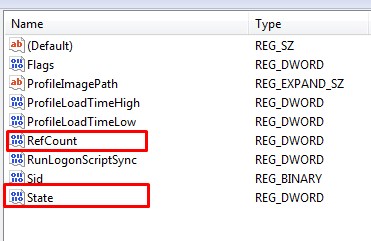
Lets take a look inside the key:
A healthy profile should look like this:
A cool thing to note is that the ProfileImagePath points to the home directory of the user. An unhealthy profile will display the ProfileImagePath to c:\users\temp, and the RefCount will have a value higher than 0.
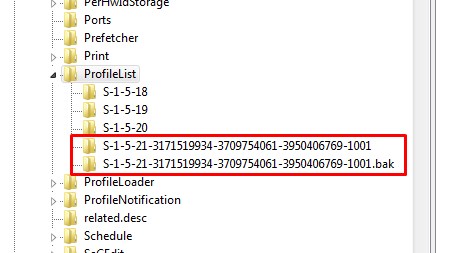
To solve the problem, login to an administrator account other than the one that has the issue.
Next modify the key name that doesn't have the .bak to .ba.
Now Rename the key that HAS the .bak and remove the .bak.
Finally modify the key name that HAS the .ba to .bak
Once that is done, you will need to modify a few more things in the key without the .bak.
We need to change the RefCount to 0
We need to clear the state in State to 0
Now its time to reboot and try to login.
This worked for me. What your more or less doing is manually changing the state of the profile from the backup state to a local state
PROPS to Tmatthews / http://microitblog.com/micro-it-blog/2012/01/17/windows-7-profiles-wont-load-stuck-with-backup-status
We could try the resolution recorded in that source article to enable group policy Do not forcefully unload the user registry at user logoff policy which is located under Computer Configuration > Administrative Templates > System > User Profiles.
Subscribe to:
Posts (Atom)