Dari control panel - hardware and sound - manage audio device -
Masuk ke tab recording. Klik kanan layar dan cawang show disabled devices. Lalu enable stereo mix.
Dari control panel - hardware and sound - manage audio device -
Masuk ke tab recording. Klik kanan layar dan cawang show disabled devices. Lalu enable stereo mix.
Solusinya adalah install :
apt install python3-smbc samba smbclient
Untuk bisa print di windows
matikan dulu cups:
service cups stop
edit file /etc/cups/printers.conf
cari deviceuri, tambahkan username password:
domain%5Cusername:password@namakumputer/namaprinter
Solusi lengkap di sini:
https://www.stephenwagner.com/2019/05/05/ubuntu-linux-black-screen-frozen-system-after-upgrade-install/
Intinya harus menambahkan nomodeset di setelan grubnya.
edittambahkan nomodeset di:
GRUB_CMDLINE_LINUX_DEFAULT="quiet splash nomodeset"
lalu jalankan
update-grub
pada saat booting tekan shift lalu tekan e pada pilihan boot dan tambahkan nomodeset
Bila read only, jalankan:
mount -o remount,rw /
mount -a
This remedy is taken from this Microsoft KB article, but ill mention it here for completeness and add my thoughts to each task.
http://support.microsoft.com/kb/947215
Go to Start and run REGEDIT
Go to:

The S-1-5-21 keys actually are the configuration of the profiles in windows. one thing to notice is that there are two that are strikingly similar (S-1-5-21-1079119....) but with one difference, the .bak at the end of the key at the bottom.
Lets take a look inside the key:
A healthy profile should look like this:
A cool thing to note is that the ProfileImagePath points to the home directory of the user. An unhealthy profile will display the ProfileImagePath to c:\users\temp, and the RefCount will have a value higher than 0.
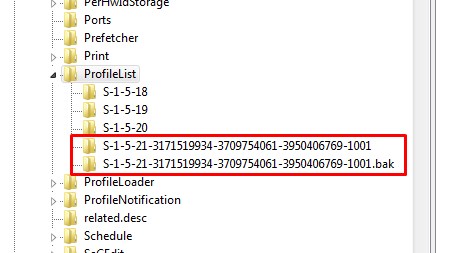
To solve the problem, login to an administrator account other than the one that has the issue.
Next modify the key name that doesn't have the .bak to .ba.
Now Rename the key that HAS the .bak and remove the .bak.
Finally modify the key name that HAS the .ba to .bak
Once that is done, you will need to modify a few more things in the key without the .bak.
We need to change the RefCount to 0
We need to clear the state in State to 0
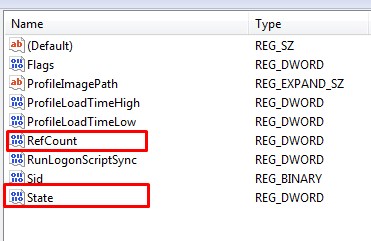
Now its time to reboot and try to login.
This worked for me. What your more or less doing is manually changing the state of the profile from the backup state to a local state
PROPS to Tmatthews / http://microitblog.com/micro-it-blog/2012/01/17/windows-7-profiles-wont-load-stuck-with-backup-status
We could try the resolution recorded in that source article to enable group policy Do not forcefully unload the user registry at user logoff policy which is located under Computer Configuration > Administrative Templates > System > User Profiles.
Here's how I eventually got the hard-core non-updating windows 10 machines back to normal.
In SOME cases, the Windows 10 Update Assistant would at least bump up the current patch level, in some cases not.
hi, thanks for reporting this. can you try if this change can workaround the performance problem?: go to the firefox menu ≡ > options > privacy & security panel and under permissions check the setting to prevent accessibility services from accessing your browser.
In Firefox 68+ you can only disable multi-process by creating an environment variable named MOZ_FORCE_DISABLE_E10S and set its value to 1. You can either use a .cmd file to start Firefox or set this variable in the Windows Control Panel -> System.
di windows xp ada di system - advanced - environment variables - system variables
Trik ini hanya berlaku hingga versi 80.0.1 . Versi selanjutnya sudah tidak mendukung.
Untuk mencegah update, file maintenance dan update exe perlu dihapus.
